Tour operators with multiple guides: how to manage licenses and teams with VoiceGuide AirLink
When you work alone, running VoiceGuide AirLink is simple: buy a license, enter it in the app, share the PIN. But if you're a tour operator, an agency or a cooperative with several guides working at the same time — maybe in different cities, with groups of different sizes — the question changes: how do I organize licenses for the whole team, without waste and without surprises on tour day?
This guide is written for exactly that. If you're running your very first tour, start with this step-by-step guide; if you want to understand why more and more operators are leaving traditional radio systems behind, you'll find the full comparison in this article.
The starting advantage: no kits to pass around
With radio systems, managing several guides means managing several cases of equipment: who has the kit today, who's bringing it back tonight, how many batteries are charged, how many receivers went missing with the last group. It's physical logistics that grows with every guide you add.
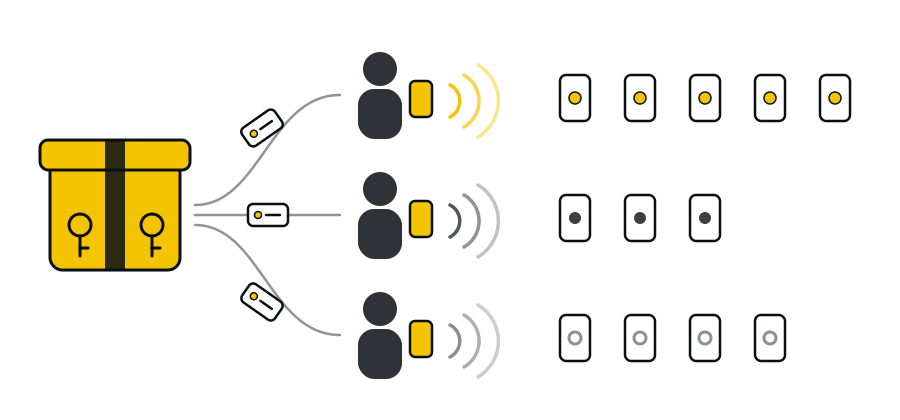
With a smartphone app that whole layer disappears: what goes from the office to the guide is no longer a case, but a code. You can send it by email or WhatsApp the evening before, even to a guide in another city. The organizational work shifts to something much lighter: deciding which code goes to whom.
How licenses work when you work as a team
Before organizing your team, it helps to be clear on four basic rules:
- Licenses aren't tied to a person. A code isn't linked to anyone or to an account: any guide on the team can use it. No sign-up, either in the app or on the website.
- One license = one tour. Each code unlocks a single tour session. The morning group and the afternoon group need two licenses, even with the same guide.
- Codes don't expire; the clock starts at activation. An unused code stays valid with no time limit: a package bought today can still be used months from now. Once activated, it covers one tour of up to 4 hours, and the countdown starts the moment the code is entered in the app.
- Capacity is a hard limit. A 25-guest license accepts at most 25 connected guests: the 26th can't join. Pick the size based on the real group, with a little margin.
Almost everything in the method below follows from these four rules.
Choosing the right package for your calendar
If you work regularly, packages cost less per tour than single licenses. Here's the comparison at current prices:
| Option | Guests per tour | Price | Cost per tour | Equivalent single license |
|---|---|---|---|---|
| Tour Operator package (10 licenses) | 25 | € 119.00 | € 11.90 | € 14.99 |
| 5 Tour package (5 licenses) | 25 | € 59.99 | € 12.00 | € 14.99 |
| 5 Tour package (5 licenses) | 35 | € 79.99 | € 16.00 | € 19.99 |
| 5 Tour package (5 licenses) | 50 | € 111.99 | € 22.40 | € 27.99 |
| School package (5 licenses) | 100 | € 199.00 | € 39.80 | € 49.99 |
A few rules of thumb:
- "Standard" groups of up to 25 people, lots of tours per month: the Tour Operator package is the natural starting point. 10 licenses cover, for example, two weeks of work for a team running one tour a day.
- Larger but recurring groups (35 or 50 people): the 5 Tour packages in the matching size.
- Schools and large events: the School package, with licenses for up to 100 participants.
- Unusual or occasional groups: you don't need a package for everything. A group of 8 is covered by a single 10-guest license (€ 6.99), without using up a 25-guest license from your package.
In practice, the combination that works best for most operators is: a package for the size you use most often, plus a few single licenses for the exceptions. All current prices are on the licenses page.
Handing out codes to your guides
After buying a package you receive a single email with the full list of license codes. From there, the management is in your hands. Two models work well:
- Assign per tour (recommended). The office keeps the codes and sends one to the guide together with the job sheet (time, meeting point, number of participants). Each guide gets only what they need, and you always know which codes have been used.
- A small stock for the guide. A very busy guide, or one working far from the office, gets 2–3 codes in advance to use independently, reporting back which ones were used. More flexible, but it takes a bit of discipline in reporting.
Either way, the most useful tool is a license log: a shared sheet (Google Sheets, Excel, even a well-organized team WhatsApp group) with a few columns:
| Code | Size | Assigned to | Tour date | Group / client | Status |
|---|---|---|---|---|---|
| ••••-01 | 25 | Julia | 14/10 | School group, Milan | Used |
| ••••-02 | 25 | Mark | 15/10 | Cruise, morning shift | Assigned |
| ••••-03 | 25 | — | — | — | Available |
Five minutes to update it each time, and you'll never find yourself asking "has someone already used this code?".
Golden rules for the team
Share these with all your guides, ideally as a short pinned message in the team chat:
- Activate the code only on the day of the tour, shortly before starting. Since the countdown starts when the code is entered, activating it the night before "just in case" means finding an expired license in the morning.
- One code per group, never reuse it. Once the morning tour is over, the afternoon needs a new code.
- Check the size before you set off. If the client added people at the last minute and the group exceeds the capacity of the assigned license, it's better to find out at the office than at the meeting point.
- Keep a spare code. On days with many tours running in parallel, one extra unassigned license available to anyone solves the unexpected (a group that doubled, a tour added at the last minute).
- Each guide uses their own phone. No company devices needed: the guide uses their own smartphone with the app installed, and guests use theirs.
Several groups at the same time: how it really works
It's the question tour operators ask most: "If I have three guides in the same square at the same time, will the groups interfere with each other?"
No. Every license that's started generates a different PIN, and every PIN corresponds to a separate session. Guide A's guests only hear guide A, even if guide B's group is ten meters away. There are no radio channels to coordinate and no overlapping frequencies: the app keeps the groups apart.
A concrete example of a morning with three guides:
- Julia is showing 22 cruise passengers around → a 25-guest license from the Tour Operator package.
- Mark has a school group of 48 students → a 50-guest license from the 5 Tour package.
- Sara is accompanying two families, 9 people → a single 10-guest license.
Three codes, three PINs, three independent groups. And at the end of the day nobody has to count receivers or put batteries on charge.
Invoicing and repeat purchases
At checkout you can request an invoice by entering your tax code, VAT number or company VAT ID: one invoice for the whole package, easy to handle in your accounts. For repeat purchases or special requirements, you can reach us by email or WhatsApp from the contact page.
If you recommend the app to others: the Partner Program
Many tour operators and agencies work with freelance guides, accommodation providers or other agencies they recommend tools to. With the Partner Program you get a personal code: anyone who buys with your code gets a 5% discount, and you earn a commission of 10% to 20% on every purchase, depending on your partnership level (BASE, PRO or ELITE). All activity can be tracked from a dedicated partner dashboard.
Checklist to get your team started
- Estimate how many tours you run per month and the size of your most frequent groups.
- Pick a package for your most common size and keep single licenses in mind for the exceptions.
- Set up the shared license log.
- Send your guides the golden rules (above all: activate the code only on the day of the tour).
- Run a test with the team before the season: one guide starts a tour, two colleagues join with the PIN.
Ready to organize your team
Managing several guides with VoiceGuide AirLink doesn't take a storeroom, equipment cases or inventories: it just takes a good method for assigning codes. Once the log is set up and the rules are shared with the team, the rest takes care of itself.
Want to test it first with one of your guides? Request a free trial license, or explore the packages designed for teams.